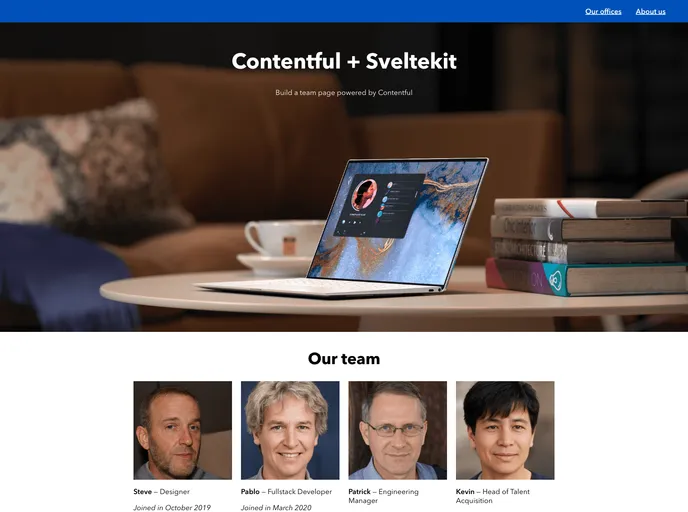
Sveltekit Starter screenshot

Sveltekit Starter

Author Avatar Theme by Contentful
Updated: 26 Nov 2025
18 Stars

Starter repo to get started with Sveltekit and Contentful

Categories

Overview

The Contentful and Sveltekit starter is a resource that provides everything you need to build a SvelteKit project with Contentful. It includes instructions on fetching data from the Contentful GraphQL API, creating dynamic routes, using the Svelte component lifecycle, displaying a map using Google Maps, and utilizing private environment variables server-side.

Features

  • Fetch data from the Contentful GraphQL API: Learn how to retrieve data from Contentful’s GraphQL API to populate your SvelteKit project.
  • Create dynamic routes: Understand how to create dynamic routes within your SvelteKit project with the help of the starter.
  • Use the Svelte component lifecycle: This starter demonstrates how to effectively utilize the lifecycle of Svelte components.
  • Display a map using Google Maps: Learn how to integrate Google Maps into your SvelteKit project to display a map.
  • Use private Environment Variables server-side: Discover how to use private environment variables securely on the server-side of your SvelteKit project.

Installation

To use the Contentful and Sveltekit starter, follow these steps:

Step 1. Get the source code and install dependencies

  • Clone this repository.
  • Install the necessary dependencies.

Step 2. Create an account and grab your secrets

  • Create a Contentful account with an empty space.
  • Find your Space ID in your Contentful space.
  • Create an access token for the Content Delivery API.
  • Create an access token for the Content Management API.

Step 3. Create an environment file

  • Rename the .env.example file at the root of your project to .env (to be ignored by Git).
  • Replace YOUR_SPACE_ID, YOUR_DELIVERY_TOKEN, and YOUR_MANAGEMENT_ACCESS_TOKEN in the new .env file with the corresponding values from Step 2.

Step 4. Import the content model

  • The project provides a Contentful set up command that imports the required content model and adds sample content to your space.
  • Run the specified command to import the content model.

Step 5. Run the project locally

  • Start the development server, which will open the app in a new browser tab.
  • Any changes you make will automatically reload the page.

Building

  • To create a production version of your app, use the appropriate npm script.
  • Preview the production build with npm run preview.
  • If you need to deploy your app, check if you require an adapter for your target environment.

Summary

The Contentful and Sveltekit starter is a comprehensive resource that provides all the tools necessary to build a SvelteKit project with Contentful. From fetching data using GraphQL to creating dynamic routes and utilizing the Svelte component lifecycle, this starter covers various essential features. Additionally, it guides users through the process of displaying a map with Google Maps integration and utilizing private environment variables securely on the server-side. By following the installation steps, users can quickly set up the project and start building their SvelteKit app with Contentful.
