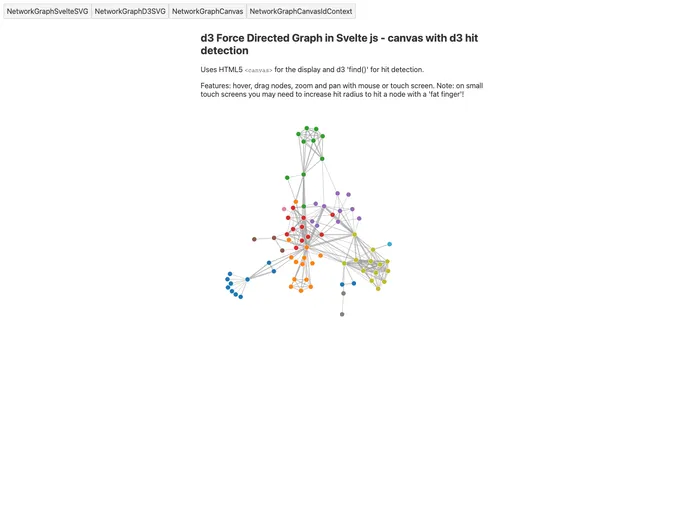
D3 Fdg Svelte screenshot

D3 Fdg Svelte

Author Avatar Theme by Happybeing
Updated: 3 Mar 2021
53 Stars

d3 Force Directed Graph example (d3-force) implemented in sveltejs. REPL:

Overview

The D3 Force Directed Graph in Svelte project provides Svelte JS versions of the D3 Force Directed Graph example. It offers different implementations of the graph using Svelte and D3 SVG elements or canvas with various hit detection methods. The project is aimed at testing performance and compatibility with touch screens.

Features

  • Svelte SVG Implementation: NetworkGraphSvelteSVG.svelte uses Svelte SVG elements for the graph.
  • D3 SVG Implementation: NetworkGraphD3SVG.svelte uses D3 SVG elements for the graph.
  • Canvas with D3 Hit Detection: NetworkGraphCanvas.svelte uses canvas with D3 hit detection for the graph.
  • Canvas with Second Context for Hit Detection: NetworkGraphCanvasIdContext.svelte uses canvas with a second context for hit detection.

Installation

  1. Make sure you have Node.js and yarn installed on your system.
  2. Clone the repository and navigate to the project’s root folder.
  3. Install the project dependencies by running the following command in your terminal:
yarn install
  1. Start the Rollup server by running the following command:
yarn start
  1. Open your web browser and navigate to localhost:5000 to view the app.

Summary

The D3 Force Directed Graph in Svelte project provides multiple implementations of a force-directed graph using Svelte and D3. It offers different options for rendering the graph, including SVG and canvas with various hit detection methods. The project is designed to test performance and compatibility with touch screens.