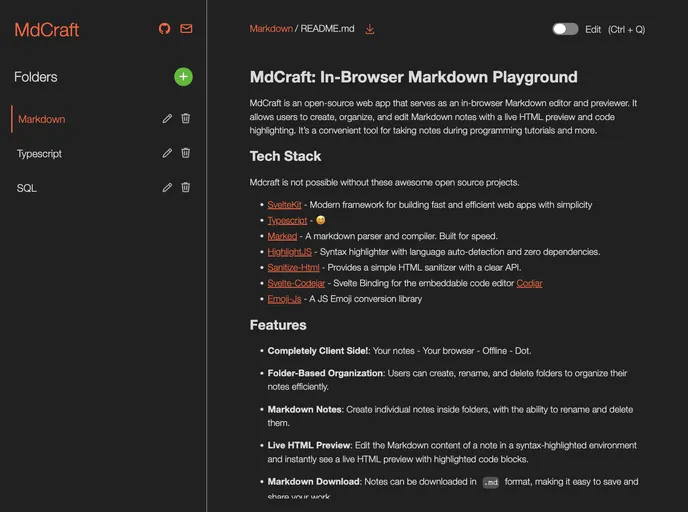
Mdcraft screenshot

Mdcraft

Author Avatar Theme by Lovelindhoni
Updated: 31 Aug 2024
36 Stars

MdCraft - In-Browser Markdown Playground built upon Sveltekit and Typescript

Categories

Overview

MdCraft is an open-source web app that serves as an in-browser Markdown editor and previewer. It allows users to create, organize, and edit Markdown notes with a live HTML preview and code highlighting. MdCraft is a convenient tool for taking notes during programming tutorials and more.

Features

  • Folder-Based Organization: Users can create, rename, and delete folders to organize their notes efficiently.
  • Markdown Notes: Create individual notes inside folders, with the ability to rename and delete them.
  • Live HTML Preview: Edit the Markdown content of a note in a syntax-highlighted environment and instantly see a live HTML preview with highlighted code blocks.
  • Markdown Download: Notes can be downloaded in .md format, making it easy to save and share your work.
  • Data Persistence: All data is stored in IndexedDB, ensuring no data loss even if you refresh the page.
  • PWA Support: MdCraft is presented as a Progressive Web App (PWA) with full offline capabilities, making it accessible wherever you are.

Installation

To set up MdCraft, follow these steps:

  1. Clone the repository: git clone [repository-url]
  2. Install dependencies: npm install
  3. Run the development server: npm run dev
  4. Open a web browser and navigate to http://localhost:5173

Summary

MdCraft is an in-browser Markdown editor and previewer that offers features such as folder-based organization, live HTML preview, and data persistence. It is a useful tool for taking notes during programming tutorials and offers the convenience of downloading notes in .md format. With its PWA support, MdCraft can be accessed offline, making it accessible wherever you are. Installation is easy, requiring only a few steps to get started. Overall, MdCraft is a valuable tool for Markdown editing and note-taking.
